Google Gemini
Our pick: free with no credit card, and the fastest option. Create a key in Google AI Studio in about a minute — it runs every lesson, flashcard and pitch diagram, plus the voice features: text-to-speech and Live Sensei.
進め日本語
AI と一緒に日本語をマスターしよう
Your all-in-one platform for a focused Japanese-learning journey.
Japanese learning without the bullshit.
See it in action
Three tools, one workflow. Each demo plays on its own — or click straight into it and drive.
Step 1 of 3·Type any phrase, in any language you already speak.
A scripted preview you can click through. Nothing here calls the AI.
All tools in one place
A complete toolkit with AI at its core. Practise, review, and retain vocabulary like never before. All materials are completely free and no sign-in is required.
Type any phrase and get contextual translations, grammar breakdowns, and natural variations — powered by Gemini, Claude, GPT or a free model of your choice.
Start a lesson →A structured guide from writing systems to verb conjugation. Work through chapters at your own pace with progress tracking and an AI assistant.
Read book →Speak with an AI Japanese coach in real time. Choose a focused practice mode, role-play real scenarios, and get immediate speaking feedback.
Start chatting →Review vocabulary with the same spaced-repetition algorithm used by Anki. Each card adapts to your memory for optimal retention.
Review cards →Learn more than 1,200 JLPT N5, N4 and N3 vocabulary words. Quiz yourself on meanings, readings, types, and example sentences.
Study vocabulary →Master 186 JLPT N5, N4 and N3 kanji with interactive quizzes. Track your streak and see meanings, readings, and example sentences.
Practise kanji →Learn all hiragana and katakana characters through timed quizzes with progress tracking and visual review grids.
Learn kana →Master 209 JLPT N5, N4 and N3 grammar points with interactive quizzes. Learn meanings, patterns, and example sentences.
Study grammar →Hear every word and sentence read aloud by Kokoro, a natural AI voice that runs privately in your browser — no API key, nothing sent to a server. Best on a laptop or desktop; your device’s own voice is always there too.
Listen →Train with JLPT-style questions and a realistic exam flow for N5/N4. Practise under timed conditions and strengthen your test-day confidence.
Browser extension
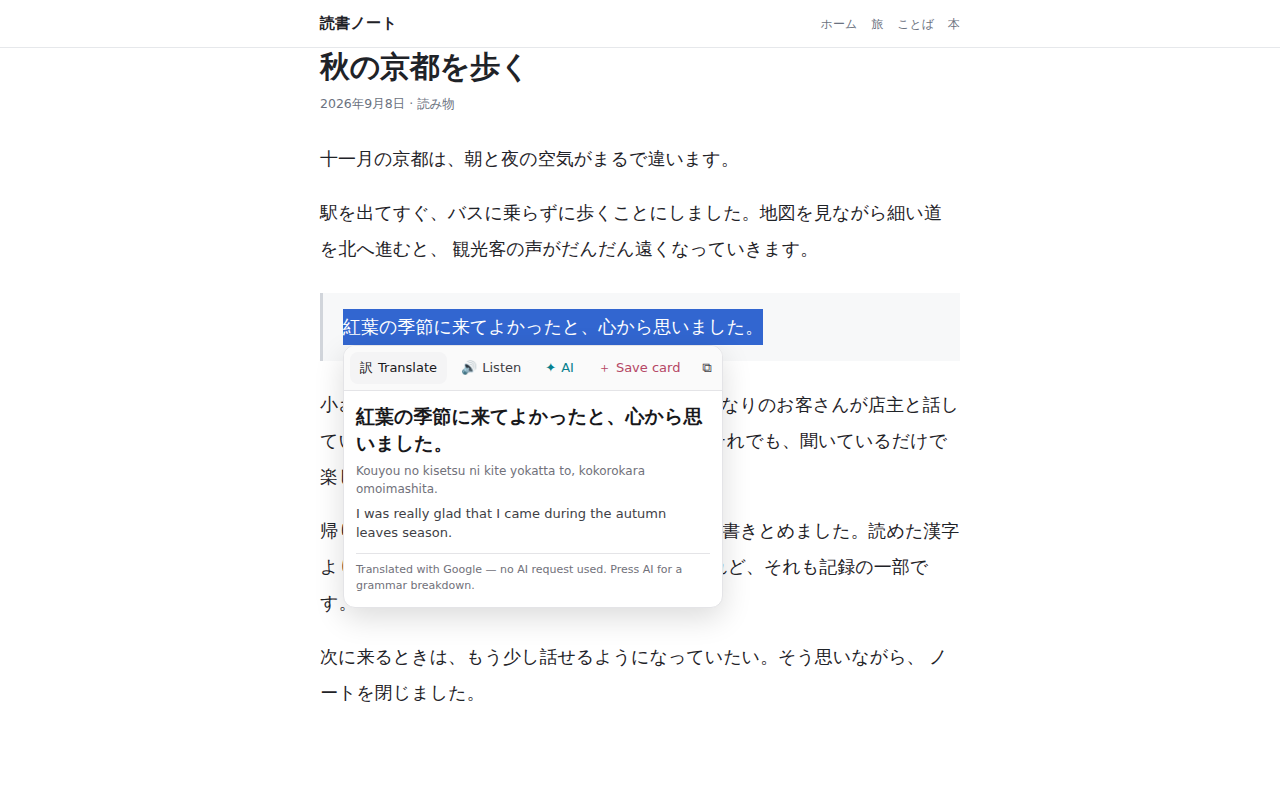
Select text on any page and a small bar appears. Translate it, hear it, break it down, or send it straight to your FSRS deck — without leaving what you are reading.
Translate
Translation, romaji reading and dictionary senses. Free — no AI request.
Listen
Hear the selection spoken in Japanese. Free.
AI breakdown
A reading and a word-by-word grammar breakdown on your own AI key. The only button that ever spends a request.
Save card
Files it as a flashcard. Cards wait on your device and land in your deck the next time you open Susume Nihongo.
No account, no analytics, no server of ours. It reads only the text you select.

Writing systems, grammar basics, particles, and verb conjugation in one clear guide.
From N5 to N1: a hybrid-immersion strategy with level-by-level breakdowns and time estimates.
Shopping, vacations, part-time work, first dates, dining, and the everyday rules that make Japan feel easier.
Manifesto
I am a Japanese-language student and used many different tools to support my learning. Adding AI helped, but managing so many platforms became exhausting—many were paid and contained more advertising than Japanese-learning content.
As an engineer, I wanted to create something simpler, more efficient, and free. I chose Google AI because anyone can access Gemini’s free tier, which includes a broad range of capabilities such as Live and TTS.
Susume Nihongo is not meant to replace a good textbook or teacher. It is a central complement to your studies, and I hope it supports your Japanese-learning journey.
I am currently at N4 and will keep expanding the platform as I progress.

Your AI, your choice
Start free with no credit card, or bring the models you already pay for. Your keys stay in your browser.
Our pick: free with no credit card, and the fastest option. Create a key in Google AI Studio in about a minute — it runs every lesson, flashcard and pitch diagram, plus the voice features: text-to-speech and Live Sensei.
Press Connect OpenRouter in Settings and sign in — no key to copy. Use free models (up to 50 requests a day, no card needed) or Claude and GPT with OpenRouter credits.
Already have an Anthropic or OpenAI account? Paste your API key and learn with Claude or GPT, billed directly by them.
Voice features always use Gemini. Every key stays in your browser and is sent only to the provider you choose — never to our servers.
Quick setup
No installation needed. Everything runs in your browser.
Create a free Google Gemini key in under a minute, or connect OpenRouter to use free models. No credit card required.
Paste your key or press Connect OpenRouter in the AI Teacher settings. Keys stay on your device and are never sent to our servers.
Type any phrase and receive a complete Japanese lesson: translation, grammar, pronunciation, and more.
Free tiers are set by Google and OpenRouter and may change. If you reach them, consider adding credits or optimising usage.
Add it to your home screen for instant access. It opens directly to the AI Teacher, works offline, and feels like a native app.
今すぐ始めよう
Free, browser-based, and ready in just a minute.
Launch AI Teacher